How to run Modify Detections
What can I do with Modify Detections?
- Fix mislabeled detections.
- Relabel unknown detections in bulk.
- Remove noisy or irrelevant detections.
- Prepare corrected labels for LDA or other automated propagation.
1. Select dataset
- Open dataset or view in FiftyOne.
- Optionally select a lasso or patch view for fine-grained editing.
2. Launch the operator
- Select
Modify Detectionsin theBrowse Operationsmenu.
3. Select action
change_label– Assign a new label to selected detections.remove_detections– Delete detections from the sample or patch view.
4. Select scope
You can apply Modify Detections to the entire dataset, the current view, or the selected samples.
5. Select unknown_only
Unless you're confident about modifying an inaccurate label, it's recommended to select unknown_only when editing in bulk to avoid changing confirmed labels.
6. Execute operator
- Click Execute and wait for the operator to finish.
Modify Detections
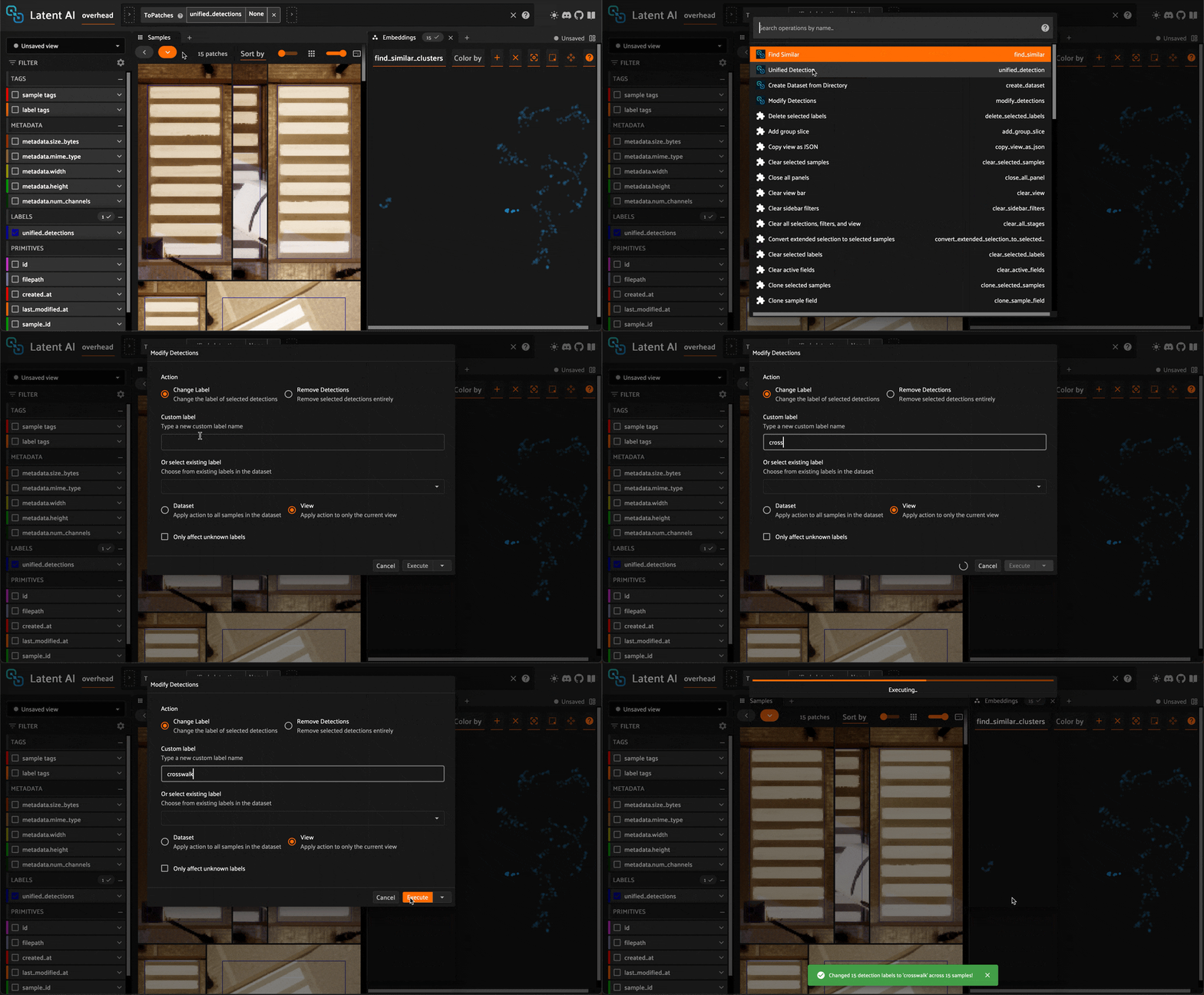
7. Inspect results
- Open samples to confirm labels updated or detections removed.
- Ensure
unified_detectionsreflects the intended edits. - Optionally, rerun
Find Similarto propagate new labels.
Troubleshooting
If you run into problems, consult the troubleshooting guide.